Lire regimail dans Outlook
Pour lire les regimails dans Outlook Classic, vous devez convertir le message en e-mail simple. Le plus simple est de sélectionner le message, puis d'ouvrir le menu regimail et de cliquer sur « Ouvrier/lire regimail ».
Astuce : captures d'écran tirées de la version anglaise !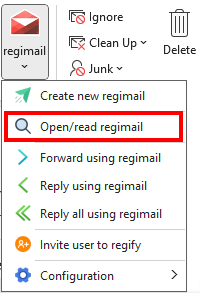
Une fois le décryptage effectué, vous recevrez une copie décryptée dont l'objet comportera la mention (regify transformé).
Si vous convertissez à nouveau le même message ultérieurement et qu'une copie décryptée existe déjà dans le même dossier, le décryptage ne sera pas effectué une nouvelle fois, mais la copie déjà décryptée s'affichera directement.
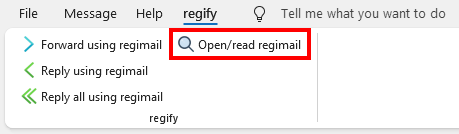
Si vous consultez déjà l'e-mail dans une fenêtre séparée, vous pouvez également trouver « Ouvrier/lire regimail » dans le menu « regify » du ruban :